Showing posts with label lenovo. Show all posts

Wednesday, February 22, 2012

Lenovo IdeaPad Z570 features


Features
In terms of system configuration, the 15.6-inch Lenovo IdeaPad Z570 isn’t too impressive. It only runs an Intel Core i3 2310M processor that operates at an average 2.1 GHz. It’s based on the new Sandy Bridge architecture, so clearly laptops using the new platform have started returning to the market. There’s 3 GB of DDR3 memory and Lenovo has bundled the 64-bit version of Windows 7 Home Basic on the laptop. There is no discrete graphics solution provided, though. This makes it clear the Z570 is no way prepared for any serious gaming. But, it does have many other nifty features. There is a large 640 GB hard drive in it, which means space for a ton of media. There is 802.11n WiFi supported through the Atheros AR9285 adapter. HDMI connectivity is also present. Suddenly, the IdeaPad Z570 comes alive with all sorts of features you don't expect in a laptop this cheap.

Design and Build Quality
The IdeaPad Z570 although in the lower end bracket of laptops, is an attractive thing to look at. The colour on the model we received isn’t too great but the finish on the lid and the Lenovo badge does makes it stand out. It’s not the slimmest of laptops and it’s by no means light-weight. The weight is probably has to do with its build quality, which is pretty good for a laptop that costs less than Rs. 35,000. The top for example, is made of metal and has a very sturdy feel to it.

Chiclet-style keyboard on the IdeaPad

Finer aspects of the design and build quality can be seen when you open the lid. The line of touch-sensitive buttons give it a very elegant look. The buttons are meant for controlling the volume of the speakers, setting screen profiles and cooling modes. The software works well with the touchscreen buttons. Operation is extremely simple. The power button too looks great and looks like it came out from a really high-end laptop. We really like the look and feel of those buttons. The tiny, but bright, backlight used for these touch sensitive buttons and also the activity indicators looks very nice indeed. Another set of indicators are positioned next to the large trackpad. These are primarily to display the power on status, charging status, wireless connectivity and trackpad status.

Speakers and the well designed power button

The keys are scalloped and have a depression in them. At first, using it feels a little awkward but the keys do have a nice feel to them. There is a little bit of feedback and the keys wobble a little bit if you press them on one corner. The speakers are positioned on the same panel as the touch-sensitive buttons.

*************

Sunday, December 25, 2011

Lenovo ThinkPad Tablet

Pros
Full-sized USB 2.0 port. Optional 3G. Excellent, though optional, keyboard folio case and accurate stylus pen.

Cons
A bit chunky. Frequent app crashes in our tests. Occasionally unresponsive screen. Subpar battery life.

Bottom Line
The Lenovo ThinkPad Tablet boasts excellent accessories that can transform the tablet into an on-the-go business machine. But short battery life and some stability issues make it a questionable choice for casual and corporate users alike.

Though tablets are growing more and more popular among mainstream consumers, they have yet to prove themselves as viable replacements for laptops when it comes to productivity. With the 10.1-inch ThinkPad Tablet ($499,16GB; $569, 32GB; $669, 64GB; direct), Lenovo puts forth a tablet aimed at business users, but it lacks reliability and performance that has made the company's ThinkPad line so successful in the corporate world. 

The most intriguing aspect of the ThinkPad Tablet is not the tablet itself, but its stylus and keyboard folio accessories, which cost an additional $140. There's some good design and functionality here including a full-size USB port, and an option to add 3G connectivity, but frustrating app crashes and some unresponsiveness hold this Lenovo tablet back.

Wednesday, December 29, 2010

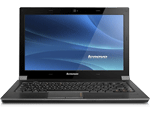
Lenovo IdeaPad V460 59-044184 Laptops

Lenovo Ideapad U460 0885-25U 14.0-Inch Laptop (Black)
IdeaPad V460
59-044184
Rs.43,179 + tax*
 Processor Intel® Core i3-350M-HM55

Lenovo IdeaPad V460 59-044185 Laptops


IdeaPad V460
59-044185
Rs.36,876 + tax* Processor Intel® Core i3-350M-HM55

Lenovo IdeaPad V460 59-043936 Laptops

IdeaPad V460
59-043936
Rs.35,090 + tax*
 Processor Intel® Core i3-350M-HM55

Lenovo IdeaPad V460 59-043531 Laptops


IdeaPad V460
59-043531
Rs.34,827 + tax*
Processor Intel® Core i3-330M-HM55

Lenovo Ideapad V460 0886-2AU 14.0-Inch Laptop (Black)

Lenovo Ideapad V460 0886-2AU 14.0-Inch Laptop (Black)


Lenovo Ideapad V460 0886-2BU 14.0-Inch Laptop (Black)

Lenovo Ideapad V460 0886-2BU 14.0-Inch Laptop (Black)
IdeaPad V460
59-043530
Rs.36,088 + tax*
 Processor Intel® Core i3-330M-HM55

Tuesday, October 12, 2010

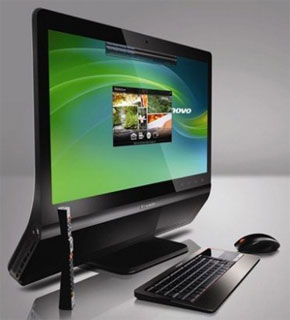
Lenovo IdeaCentre A600 Comes with the Latest in Desktop Design


Lenovo’s desktops and laptops are normally very business-minded, with apparently little thought given to style. But not the IdeaCentre A600. It has looks to compete with HP TouchSmart and Apple iMac. Lenovo actually claims that it’s the thinnest AIO computer in the market today, and from its looks, it’s most likely true. It’s not a touchscreen AIO like HP’s TouchSmart series though, but the A600 introduces a different form of interaction altogether in the form of its 4-in-1 remote control.